Want to convert your DVD into a video file that you can play on any computer, but don't feel like fussing with complicated DVD ripping software? It doesn't get much simpler than bitRipper. All you need to do is pop a DVD into your optical disc drive, fire up bitRipper, and click the Start ripping button. That's it.
Of course, you can click the settings tab to access more advanced features. For instance, you can change the audio or video codecs or adjust the bit rate, aspect ratio, or video resolution. At the very least, I'd recommend configuring the audio. The default settings use a ridiculously low bitrate that sounds just awful.
For some reason, when I tried ripping a video using the LAME audio codec, the audio and video were out of sync, but when I tried again using the Fraunhofer codec all was right with the world.
[Via: MakeUseOf ]
[Tag: bitripper, dvd, dvd-ripper ]
bitRipper offers one-click DVD ripping

Minimize windows to the system tray with Minime
Tired of looking at icons in your Windows taskbar representing for every running program, including ones you don't click on very often? Minime is a little Windows utility that lets you minimize applications to the system tray. But unlike Trayconizer and TrayEverything, Minime doesn't replace a dozen taskbar icons with a dozen system tray icons. Instead minimized programs are hidden behind a single Minime button.
You can minimize any program using a customizable hotkey, and you can find the hidden apps by clicking the Minime icon in the system tray. It's worth pointing out that when programs are minimized to Minime they don't show up in the Alt+Tab menu, so you'll only want to hide apps that you don't need to access very often. For example you might want to minimize your music player since it can keep the tunes going in the background without your intervention.
Minime is a single executable file that doesn't require installation. In other words, you can throw it on a USB flash drive and carry it with you for use on any PC.
[Via: TechnoSpot ]
[Tag: minime, minimize, trayconizer, trayeverything ]

Voila for Mac is a full-featured screenshot app

Yes, OSX's Grab tool is a good starting point, but I like to be able to crop, edit, add arrows and callouts, and perform other similar chores without having to launch something like Photoshop or GIMP.
Voila provides all the features I'm after. Apart from full screen, window, region, and menu capturing, it also offers an array of editing and notation functions. Arrows, callouts, shapes, and text are easy to add - and text can be edited after it's placed unlike a lot of similar applications. It also supports one-click exporting to iPhoto and Mail.
One glaring omission is resizing. It's something I use all the time, so its absence is a bit of an inconvenience.
The beta version is currently free, though the FAQ states that Voila will indeed become a commercial app. I'm just getting started on my Mac, so if you've got a better free alternative share it in the comments!
[Via: Download Squad ]
[Tag: capture, screenshot ]
IE7Pro 2.3 adds prefetching, session management to Internet Explorer

IE7Pro is a plugin for Internet Explorer 7 and 8 that brings some of the best features of Firefox and other web browsers to Microsoft's browser. Yes, we know many folks would suggest just using Firefox or Opera, but if you need to use IE for one reason or another (perhaps there are some web sites you visit regularly which aren't rendered properly by other browsers), IE7Pro can make your browsing experience much more pleasant.
IE7Pro 2.3 was released today, with a handful of bug fixes and new features, including:
- FasterIE module with support for prefetching, which should speed up your browsing experience
- Session Manager which allows you to save open tabs when closing your browser and reopen those tabs next time you login.
- The MiniDM download manager now supports drag & drop and multiple links
You can check out a complete list of updates in the IE7Pro 2.3 changelog.
[Via: CyberNet ]
[Tag: ]
Backup your Firefox, Flock, or Thunderbird profiles with MozBackup 1.4.8

Last time we checked in on Firefox backup utility MozBackup, the developer had just added support for Firefox 3 beta. Apparently it's been a busy half year over at MozBackup HQ, because this week MozBackup 1.4.8 was released, with the following new features:
- Create automatic backups via command line
- New Installer
- Supports backup of unknown files from user profiles
- Backup profiles and settings for: Firefox 2/3, Flock, SeaMonkey, Netscape Navigator 9.0, Netscape Messenger 9.0, Thunderbird, Spicebird, Firefox Portable, and Thunderbird Portable
If you're just looking or a quick way to backup your Firefox extensions, bookmarks, and other settings, you can always check out the FEBE and CLEO Firefox add-ons. But MozBackup looks like a nice all-in-on tool if you have several Mozilla-based programs that you want to backup.
MozBackup is available for Windows 98 through Vista.
[Via: CyberNet ]
[Tag: ]
Folder View adds recent and favorite folders to Windows Explorer
 Folder View is a free Windows utility that gives you quick access to the folders you use most often in Windows Explorer. You can add shortcuts for every folder in My Documents, or choose custom folders to add to the toolbar. We'd advise against selecting an entire drive, since you'll wind up with a toolbar several rows deep filled with folders. It sort of defeats the purpose of having shortcuts when it takes you five minutes to find the one you're looking for.
As Martin at gHacks points out, one of the most useful features of Folder View is the recent folders toolbar. If you've accidentally closed a folder that you want to recover, this feature can be a life saver. It's not quite as magical as the recover closed tab feature in Firefox, but it's actually more useful since you can also use the Recent folders button to access your most frequently used folders in a snap.
Folder View also shows up in your Windows download and upload dialog boxes, making it easy to keep your files organized if you like to store your downloaded files in several different directories.
[Via: Download Squad ]
[Tag: ]
Tweak your Windows animations with Lebendig
Lebendig is a free Windows utility that adds a bit of eye candy to your window transitions. When you launch or close a window you can have it fade in or out, scroll down from the top of the screen, up from the bottom, or move from left to right or vice versa. Overall there are about 15 transitions to choose from, although to be honest, some of them looked pretty much identical to us.
You can adjust just how windows look when they launch, or when they close or specify which types of windows you'd like to be affected. For example, if you want program windows to use the default Windows animations while Explorer windows fade in and out, you can do that.
Lebendig comes from the developer of DExposE2, an Expose clone for Windows. And while Lebendig certainly isn't the only tool that adds a bit of eye candy to Windows XP, it's worth checking out for its low memory footprint. It tends to use 8MB of RAM or less.
[Via: Lifehacker ]
[Tag: ]
MP3-Check examines your music collection, tells you what's wrong with it

Got a few thousand MP3s in your music collection with missing or incorrect ID3 tags? MP3-Check won't fix them for you, but it will let you know what's missing. It's a light weight utility that can process large amounts of information quickly and let you know if your MP3 files:
- Are missing ID3 tags
- Don't meet your bit rate or sample rate requirements
- Are stereo or mono
- Meet a specified volume threshold
MP3-Check also lets you choose third party tools to associate with the program so that, for example, when you find an MP3 with no ID3 information you can right click on it to launch your favorite ID3 tag editor. If your ID3 tags aren't just missing, but are actually wrong, you might want to check out a tool like MusicBrainz which will compare your files with an online database and try to find the correct metadata.
[Via: GHacks ]
[Tag: ]
NewsGator releases FeedDemon 2.7: Desktop RSS reader
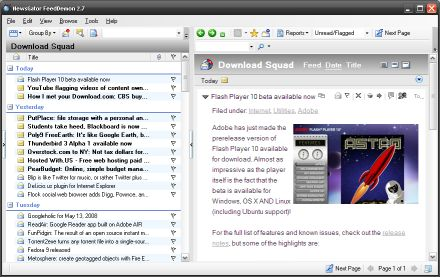
NewsGator has released an updated version of FeedDemon, the company's desktop RSS reader for Windows. FeedDemon 2.7 features a ton of bug fixes, a handful of new features, and best of all, it's still free. NewsGator used to charge for its desktop reader, but starting with FeedDemon 2.6 and NetNewsWire 3.1 for Mac the company started offering desktop clients for free.
Here are just a few of the changes in FeedDemon 2.7:
- Quicker navigation of the subscription tree
- Subscribe to multiple feeds at once from the "find feeds" menu
- Copy a multi-line URL into the address bar and it will be shortened to one line
- Support for multiple enclosures in a single post
Note that the FeedDemon home page still says the latest version is 2.6. But if you click the download link you should get FeedDemon 2.7.
[Via: Digital Inspiration ]
[Tag: ]
Microsoft releases Virtual PC 2007 SP1

Microsoft has released a new version of its free virtualization sotware with support for the latest Microsoft operating system updates. Virtual PC 2007 SP1 includes support for Windows Vista SP1 and Windows XP SP3 as host and guest operating systems. That means you can run the virtualization environment if you're using those operating systems, or if you want to emulate them. Microsoft also threw in Windows Server 2008 Standard for good measure.
Like its predecessor, Virtual PC 2007 SP1 does not officially support Windows XP Home Edition or Windows Vista Home Premium or Home Basic. But for the most part, it will run just fine on those operating systems. You will, however, get a warning message telling you that you're using an unsupported OS when you install the software.
[Via: WinBeta ]
[Tag: ]
Monitor your hard drive usage with DriveSpacio
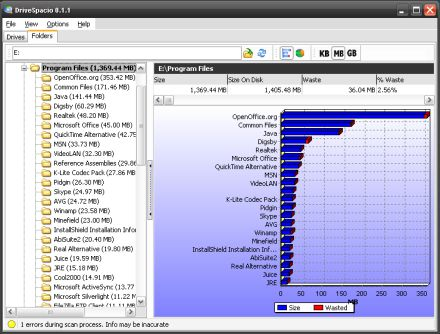
DriveSpacio is a free Windows utility for examinging hard drive usage. When you first boot the program you'll get a list of each hard drive and partition on your system, along with, some details like the files system, cluster size, and a pie chart or bar graph showing used and free space.
But the fun really begins when you click on the Folders section. You can choose a folder, or an entire drive (just click C: or E: or what have you in the browse window), and DriveSpacio will plot your folders on a graph showing you which of your folders are eating the most space. It taks a few moments to scan folders with a lot of subfolders or files, but the result is a pretty effective tool for figuring out why you're running out of space on your hard drive.
WinDirStat is another free utility which does pretty much the same thing. But if you prefer the bar graph/pie chart look to WinDirStat's more abstract-looking visualization, DriveSpacio is worth a look. But there is at least one area where WinDirStat holds the edge: while you can delete files from the WinDirStat interface, DriveSpacio only shows you file and folder names. It doesn't let you launch or delete files.
[Via: Shell Extension City ]
[Tag: ]
Cyber Bandwidth Monitor: Keep track of your bandwidth usage
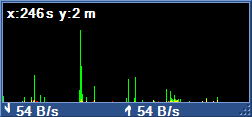 Cyber Bandwidth Monitor does pretty much exactly what you'd expect it to do, and more. This little WIndows utility tracks your upload and download speeds over time and plots your network activity on a little graph. The utility grabs data once per second, but you can adjust the settings so that it refreshes more frequently. You can also tweak a ton of display settings, ranging from the font and window size to the graph scale.
In addition to real-time information, the program also logs all of your activity over time and can send you daily, weekly, or monthly updates. Cyber Bandwidth Monitor also has a few other useful features, like built in Ping and Traceroute utilities.
[Via: Shell Extension Cty ]
[Tag: ]
Run programs as another user without logging off
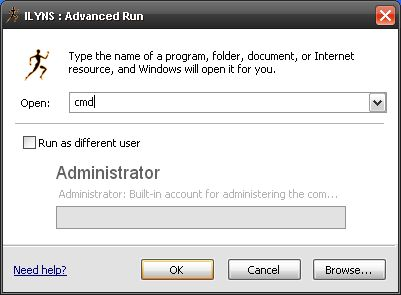
Advanced Run is a utility that replaces the Windows Run dialog with an advanced version. But it has one feature up its sleeve that you won't find in the Windows run box: the ability to run any program as another user without logging out and logging back in as that user.
You can launch Advanced Run by clicking Run in the Windows Start Menu, hitting the Win+R keys on your keyboard, or startng a new task from Windows task manager. You can also right-click on any program and select Run As to run the program as another user.
Advanced Run works with Windows XP and Vista, but will not work with 64 bit versions of Windows.
[Via: Shell Extension City ]
[Tag: ]
Visual ToolTip adds Vista-style taskbar previews to Windows XP

While we know a lot of folks like to pan Windows Vista's new graphics as useless eye candy, there are a few aspects of the Aero interface that are actually pretty useful. For example, in Windows Vista you can get a real-time thumbnail preview of running applications by scrolling over the Windows taskbar. But you can get this feature without switching operating systems, thanks to Visual ToolTip, a free application from Chris'n'Soft.
In order to run Visual ToolTip, just download and unzip the file and click on VisualToolTip.exe. The settings menu will open up, but you don't have to configure anything if you don't want to. You can just start scrolling your mouse over your taskbar to see previews of your running applications. You can click on the Visual ToolTip icon in your system tray if you do want to adjust the image size or animations.
Because Windows XP lacks some of the under the hood features included in Vista, Visual ToolTip doesn't show you real-time previews, but it will make a new snapshot every time you mouse over an icon. In other words, if you've got a video playing, you won't see a tiny video show up in the thumbnail. But you should see the frame that was playing when you moused over.
Visual ToolTip also packs a program launcher dock which you can use to replace the Windows taskbar. But there are far better dock applications out there, including RocketDock and ObjectDock if you're looking for a program launcher.
[Via: Life Rocks 2.0 ]
[Tag: ]
DivX Mobile Player 0.90 released for Windows Mobile

[Via: Pocket PC Thoughts ]
[Tag: ]
Detect and track registry changes with RegRunner
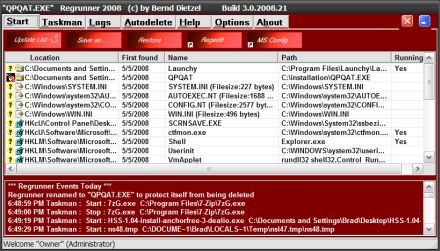
While not every program that posses a threat to your PC will attempt to write changes to your Windows registry, an awful lot will. So one way to keep your computer healthy is to track any changes to your registry. RegRunner is a free utility that hangs out in your system tray until a registry change is made, and then it pops up to let you know that something's going on. In other words, if you install and uninstall software on regular basis, RegRunner could be just as annoying as the user account control pop-up in Windows Vista. But just like the UAC, RegRunner can also prevent you from doing anything too foolish.
RegRunner also has a couple of other useful features. It will show you a list of programs that load when Windows starts. Another tab shows running processes.
The program does not include an uninstaller. If you want to remove RegRunner from your system, you'll have to delete installation directory and the shortcuts from the Startup folder in your Windows start menu.
[Via: Inspect My Gadget ]
[Tag: ]
WinUpdatesList displays every Windows update ever applied to your PC
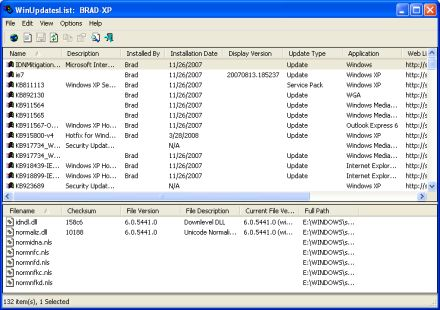
If you have Windows Update configured to automatically download and install hotfixes, security updates, service packs, and other updates, it's not always easy to see exactly what you're installing or what's already been packed onto your PC. WinUpdatesList is a simple application that brings up a list of all the updates that have been applied to your PC.
You can run WinUpdatesList simply by downloading and unpacking a ZIP file and clicking on the executable. There's also a version with an installer/uninstaller available if you'd rather go that route. The program presents a detailed list of each update, what programs it affects, and a brief description, which may or may not be utterly meaningless. But if you double-click an update, you can get a link to the Microsoft knowlede base article, which will (occasionally) make order out of the madness of Microsoft's hotfix naming scheme.
[Via: GHacks ]
[Tag: ]
StarBurn: Free disc burning, audio ripping utility
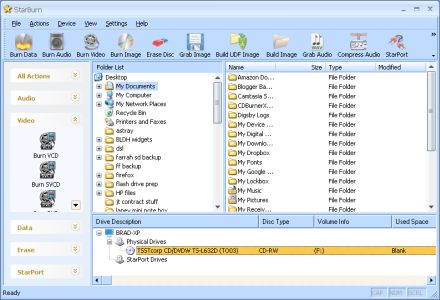
There are plenty of free CD/DVD burners for Windows, and to be honest we haven't often been tempted to look beyond CDBurnerXP and InfraRecorder, which both seem to handle pretty much any tasks you can throw at them. But while reading an article about BurnOn over at Life Rocks 2.0, we noticed a link in the comments to StarBurn. And while we might check out BurnOn later, we were kind of blown away by StarBurn.
The application can handle all of your basic tasks like burning data, audio, and video discs. It supports a wide variety of formats including CD, DVD, Blu-Ray, and HD-DVD. And it has some nifty features like the ability to either rip audio CDs or compress audio already on your computer to MP3, WMA, or OGG formats.
One StarBurn feature that you don't often see bundled with disc burning utilities is a virtual drive mounting application. In other words, you can use StarBurn to create a disc image or ISO file, and then mount that file as a virtual disc so you can see how it performs without actually burning the file to a disc and sticking it in a drive. This can come in handy if you want to see check an image before burning it, or if you want to mount an image you've created or downloaded on a system that doesn't have a working optical drive.
StarBurn is free unless youw ant the network version, which offers network burning features and costs a whopping $495. The full functionality is included in the free version, but you can only use the network features during a 30 day free trial period.
[Via: Download Squad ]
[Tag: ]
Z-Cron makes Windows task scheduling easy
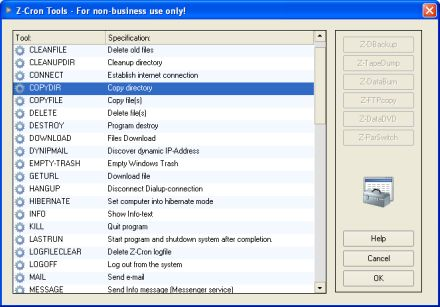
Z-Cron is a free task scheduling utility for WIndows. But wait, doesn't Windows aready include a task scheduler? Yes, but it's not exactly what we'd call user friendly. And while Z-Cron might look a little intimidating at first glance, it includes a nice long list of activities that you can schedule with just a few clicks. Here are just a few of the tasks included:
- Alarm CLock
- Cleanfile - delete old files
- CopyDir - Copy a directory (great for performing daily, weekly, or monthly automated backups)
- Delete files
- Download files
- Empty trash
- Hibernate
- Log out
- Move a directory
- Switch a screensaver on or off
- Send an email
- Shutdown
- Standby
While there are a ton of tasks built into the interface, you can also create your own by selecting programs you want to name and scheduling a time for them to run.
[Via: LifeRocks 2.0 ]
[Tag: ]
Supercharge your file renaming tasks with WildRename
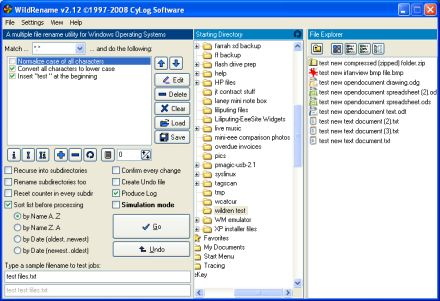
While Windows lets you rename multiple files at once by selecting a group of documents with your mouse and clicking rename, you don't have a lot of control over the process. What if you want each file to keep its original name, but you want to add a prefix. Or what if you want to change all of the characters from upper case to lower case? Windows doesn't give you that option, but the free Windows utility WildRename does.
WildRename comes in a small, executable package, meaning you there's nothing to install on your PC, and you can even run the application from a USB flash drive. Once it's up and running you can navigate to the directory of your choice and select from a list of possible actions to perform, including:
- Changing the case
- Add or remove characters
- Replace strings of characters
- Add text counters to a series, such as _001
There's also a handy simulation mode which lets you preview the changes before writing them to your actual documents.
[Via: GHacks ]
[Tag: ]