There aren't many gadgets on my Vista or Windows 7 desktops yet. I have a hard time finding any that are compelling enough to keep installed. This handy little one from Raneri Web Design, however, is firmly lodged in the sidebar of my workbench computer.
The gCalTasks gadget is a slick desktop timer that integrates with your Google Calendars. Enter your credential and choose the calendar to track your times on - I decided to set up a brand new one specifically for tracking.
Enter a tag line for your task, click start, and then click stop when you're done. Information is automatically sent to your calendar, where the agenda view provides a nice recap of your activities. It's a simple, low-resource way to keep tabs on your time.
Thanks, Ricardo!
[Via: Download Squad ]
[Tag: billing, google-calendar, tasks, time-tracking, timer ]
Track task times in your Google Calendar with a Gadget

The Google Android user interfaces that didn't make the cut
In case you haven't heard, the T-Mobile G1, or the first mobile phone to run the Google Android operating system, is now available. As we've discussed before, Android has an interesting user interface, that's something of a cross between the iPhone UI and a Windows desktop. But have you ever wondered what design choices Google rejected?
Software design team TAT, which helped create the Google Android interface has posted a page showing a bunch of concept designs that didn't make the final cut. Some of the designs, like "Asia Cute" were obviously a bit too niche to be considered seriously. Others, like "Windows Mobile Homescreen" just seem too busy to me. But the "Browser Concept" view for the web browser is pretty attractive, if not particularly useful. And the "History Lane" interface for the music player could have given Apple's CoverFlow a run for the money.
The nice thing about Google Android is that it's not locked down like the iPhone operating system. And that means there's nothing preventing third party developers from taking some of these design ideas and running with them. Or coming up with something else entirely. We've already seen third party skins for Windows Mobile, and that's a closed source OS. With an open source OS like Android, the sky's the limit.
We'll have more Google Android updates for you throughout the day.
[Via: Download Squad ]
[Tag: ]
Googleholic for May 20, 2008

- Google gets a new office in Taipei
- Third party advertising tags on Google
- Google China mourns to commemorate earthquake victims
- FeedFlare now available for Blogger comments
Having been in Taiwan for two years, Google decided it needed to move the office from their 37th floor location in the landmark Taipei 101. The new location? Still the Taipei 101, except now on the 73rd floor. Now Google employees in Taiwan can enjoy their amenity-laden workdays a whole 36 floors higher than before.
Third party advertising tags on Google
Now accepting: third party advertising tags on Google's content network. In North America anyway. Google has established a procedure for reviewing third party ad tags that comply with their standards and policies which allows them to implement this feature. If this prospect thrills you, check out the three part video that explains it all in luscious detail.
Google China mourns to commemorate earthquake victims
As China mourns the 50,000 earthquake victims, Google China has changed its look to a dark theme and features a link to a special search engine designed to find sites that include information about missing people. Google is also donating $2 million to help with relief efforts, $1.7 million of which will come from Google.org.
FeedFlare now available for Blogger comments
Google owned FeedBurner's FeedFlare is finally available for Blogger, allowing Blogger users to show comment counts on their RSS feeds. The comment count links to the Blogger's comment page, allowing readers of the feed to quickly reply to a post and see whether a post is a comment magnet. Which is a good thing, if not just convenient.
[Via: Download Squad ]
[Tag: ]
Bicycle powered Google Earth flight simulator
Sure Google added a flight simulator to Google Earth last year. But what fun is a flight simulator if you have to use your mouse and keyboard to navigate? Well, some. But not as much fun as flying through Google Earth while riding a bicycle, E.T.-style.
Want to build your own bike-powered Google Earth flight sim? Here's what you need:
- A programmable SunSpot wireless sensor
- A bunch of corresponding sensors
- A bike or other unit that you want to use for navigation/exercise
- Way too much free time on your hands
The flight simulator lets you know what it would be like to pedal your bike through the sky. Or you could just take your bike outside and figure out what it's like to pedal through your neighborhood.
[Via: Hackszine ]
[Tag: ]
Add Google Reader to your Firefox Sidebar

Google rolled out an improved iPhone interface for Google Reader this week, and here's something neat you can do with it: Add it to your Firefox sidebar. While you can open practically any web site in a Firefox sidebar, some web pages are better suited to the sidebar than others. And the iPhone version of Google Reader fits the bill because unlike the full version of Reader, it's designed for small, narrow screens. And fortunately, you don't need an iPhone to access the new interface.
So here's how to add Google Reader to your sidebar:
- Create a new bookmark in your bookmark manager, or by right-clicking on your bookmark toolbar.
- Use http://www.google.com/reader/i for the location.
- Make sure to check the box that says "Load this bookmark in the sidebar."
And that's it. Click on your bookmark and you should see the iPhone version of Google Reader. Bear in mind that while it's easier to navigate the new iPhone interface than the old one, Google Reader does still look best in full screen.
[Via: Download Squad ]
[Tag: ]
Googleholic for May 13, 2008

In this edition:
- Search for real estate on Google Maps
- Faces getting blurred in Street View
- Gmail gets slight loading speed boost
- Wikipedia comes to Google Maps
Search for real estate on Google Maps
Google Maps continues to get more useful, having made available a new search feature allowing users to browse and look for real estate. To access the feature, select "show search options" next to the search bar, giving you a drop down box from which you can select "Real Estate." After plugging in your query, you can order results according to price, bedrooms, and bathrooms. If you see something that catches your eye, you can then view an indexed property's original listing. This would probably come in really handy if you are prospecting some property in a particular area or just feel like sampling the prices of homes in a given neighborhood - Or looking for another way to play around with Google Maps.
Faces getting blurred in Street View
If you've been cruising through Google Maps with Street View and happened to find that you have been captured by Google's eye on ground zero, there is good news (or bad news if you liked the publicity): Google is experimenting with technology that allows them to blur faces in Street View. At this stage the blurring experiment is limited to Street View in Manhattan - but if all goes as planned all of Street View will be anonymous before long.
Gmail gets slight loading speed boost
It looks like the boys and girls at Gmail have been busy making the best even better by making the already short load time for Gmail even shorter. By measuring every transaction that occurs between the web browser and Google's servers, and then finding ways of reducing the number of requests as well as making them more cacheable, Gmail's initial load time has been reduced to four requests between "sign in" and the Inbox.
Wikipedia comes to Google Maps
And just when you thought Google Maps couldn't have more updates. There is a new button next to Street View called "More" which allows users to check out geo-tagged Wikipedia articles and photos from Panoramio. Hopefully this is just the beginning of a massive influx of additional databases getting geographically tied to Google Maps - because truly, can you ever have enough information on your map?
[Via: Google Operating System ]
[Tag: ]
YouTube flagging videos of content owners

YouTube has been linking copyrighted videos uploaded by third parties to their respective content owners. This occurred with a Modest Mouse video, which YouTube linked to the official Modest Mouse page. The link says "Contains Content From: Sony BMG," and it may be YouTube's way of preventing content owners from removing videos uploaded by fans.
Up until now, YouTube has said it shouldn't be held responsible for the copyright violations performed by its members, but it has also been very cooperative in removing copyrighted material when asked. Last year Google announced a video identification system, permitting content owners to identify (and choose how to share or remove) their content, so it seems this is what's at play here.
We're sure YouTube doesn't like to remove member videos. It's bad for business: a site with unhappy members typically means a site that eventually has no members. But if YouTube's just linking videos instead of removing them, it must be a positive step for consumers in the ongoing Copyright war.
[Via: Valleywag ]
[Tag: ]
Google Friend Connect: a social network for every site
 On Monday night, Google launched its entry into the growing field of programs that attempt to share your "social graph" -- your collection of friends and relationships -- across many social networks. The program is called Friend Connect, and it's starting with a handful of sites, including Facebook, Plaxo and Hi5. Friend Connect is also going to support applications under OpenSocial, Google's social network application platform that has been around since last November.
 For the average web user, Friend Connect means you're going to see social data cropping up on a whole bunch of websites that never included social networks before. You'll basically be able to plug in your information from any of the participating networks where you have a profile, and then you can interact with other users of the site who do the same. It's basically like a mini-Facebook built into any site.
What does this mean for site owners? Well, Google is promising to make setting up Friend Connect on your site ridiculously easy -- which is why we think you're going to start seeing it everywhere on the web. It basically generates the entire code for you, to be pasted into your existing site. If you're interested in trying it out, you can apply to Google now.Does every site really need to be a social network? Is this just an attempt to jump onto the "open" bandwagon and generate more data that might be valuable to marketers? We're sure that Google will have to deal with those questions from critics very soon, but for right now, we're still watching their bizarre "Love Da' Guacamole" demo video.
[Via: Download Squad ]
[Tag: ]
gReader Comments adds Disqus comments to Google Reader
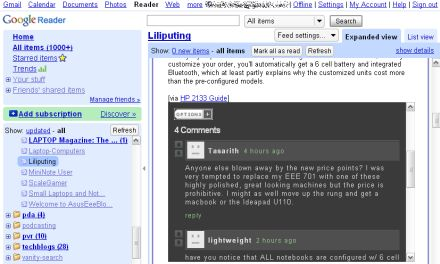
Last year two services launched, giving bloggers easy access to threaded comments, spam control, avatars, and other advanced features. Disqus and Intense Debate also let you create a single profile which you can use to leave comments on any participating blog or web site. No need to register for each individual blog.
And since last year, thousands of web sites have adopted these two commenting systems. Considering there are millions of blogs out there, that's just a drop in the bucket. But every filled bucket starts with a single drop. Or something like that. Anyway, if any of the blogs you follow use Disqus, gReader Comments is a pretty nifty Firefox plugin that will let you see comments in Google Reader without clicking through to the blog.
Once you install gReader Comments, you should notice a new box in your Google Reader post windows that says Comments. Click on this box and a Disqus window will pop up showing you the comments left on the post and offering you the chance to leave your own comments.
The plugin still needs some work. We tested it with Firefox 2.0.0.14 and Firefox 3 beta 5, and in both browsers gReader Comments failed to accurately show how many comments each post had. At first it would show no comments, and then when you click the box on a post that actually has, say 3 comments, all the boxes may say 3 comments whether here are actually comments or not. But with a little more work, this could be an extraordinarily useful plugin for anyone who spends most of their time online in Google Reader.
[Via: A VC ]
[Tag: ]
Googleholic for May 9, 2008

Welcome to Googleholic, your bi-weekly fix of everything Google!
In this edition:
- Hello says 'goodbye'
- Protect roaming users with Google Web Security for Enterprise
- New features added to Custom Search Engine
- Cannes comes to YouTube
- Selective magnification added to Google Reader
Hello says 'goodbye'
Google is discontinuing Hello, the instant messenger included with Picasa. Basically, Hello was designed as a way to share photos instantly, in a secure fashion.
The program has gone without updates for nearly three and a half years. In that time, Google has launched Google Talk, Picasa Web Albums and the ability to post pictures from Picasa directly into Blogger.
Hello will formally shut down on May 15, 2008.
Protect roaming users with Google Web Security for Enterprise
After acquiring Postini last year, Google created Google Web Security for Enterprise as a hosted security offering aimed at businesses, and designed to protect systems from malware and web attacks in real time.
Today, Google announced an add-on feature that will extend that same protection to users even when they are off network. Once enabled, all off-network traffic for a particular computer is directed at Google's scanning infrastructure, with on-the-fly filtering in place. System administrators can do audit reporting for those systems and enforce access policies as well. The best part? It is all done without the use of a VPN, so the end user doesn't have to change the way they login to use their system off-network.
Google Web Security for Enterprise is available in Europe and North America and is integrated with the professional version of Google Apps.
New features added to Custom Search Engine
Google has just announced the addition of AdSense for Search to CSE (Custom Search Engine). Google's CSE allows users to create their own custom search engine based around one or several sites, and to host that engine on their own website or blog.
In addition to AdSense for Search, Google has also enhanced the way Sitemaps work with CSE. After submitting a Sitemap through Google Webmaster Tools, Google will automatically detect any pages not indexed by Google.com and add them to your customized search engine.
Cannes comes to YouTube
The 61st Annual Cannes Film Festival kicks off next week, but just because you can't make it to France doesn't mean you can't enjoy some of the short films, thanks to YouTube and the National Film Board of Canada. Now in its fourth year, the National Film Board of Canada's Online Film Competition Cannes 2008 highlights ten short films, selected from hundreds of submissions from over 40 countries.
This year, the ten finalists are available for viewing via the NFB's YouTube channel. The winner will be chosen by YouTubers, using the standard one-to-five rating scale.
Who says YouTube can't embrace artistry?
Selective magnification added to Google Reader
The guys over at Google Reader have integrated a pretty cool accessibility option to allow selective magnification to a particular article.
Using CSS and AxsJAX, the team was able to build a magnification tool that works on the selected article, rather than the entire screen (as most magnification tools do), which makes for a better use of screen real estate.
The lens feature has been integrated into Google Reader and pressing = or - will enlarge or shrink the font for the article you are reading.
[Via: Download Squad ]
[Tag: ]
Googleholic for May 7, 2008

In this edition:
- Google Maps gets a minor makeover
- Increased photo storage on Orkut
- Multi-size embedding and select for Google Presentations
- Google supports Unicode 5.1
Google Maps has gotten a little bit prettier, flushing out some of the orange of the layout and making the search box more powerful, no longer requiring you to specify whether you're looking for a business or just an address. Well, for some users anyway, as the new UI is still in an experimental stage and will only be visible to a small number of users. But, if things go well and people like it, it may be the new face of Google Maps. Which is good because Google Maps does look a little bit more cluttered than other services offered by Google.
Increased photo storage on Orkut
Everybody's favorite unknown yet kind of a big deal Google social network just got a major upgrade, removing the limit of 50 photos per user and upping it to a glorious 10,000. Not only that, each photo seems to have a size limit of 10MB, which comes out to about 100GB of photo space which is nothing short of ridiculous. Maybe this is how Google plans on bringing Orkut to the world that uses Facebook, by making it the place all the photographers throw up their pictures in turn forcing everyone else to go to Orkut to look at them. After that... it is only a matter of time.
Multi-size embedding and select for Google Presentations
If you have been embedding Google Presentations on websites to get your point across (it's our primary means of communication here at DLS - no show no go), today is a good day because Google has decided to grant you more power over your embeds. You can pick between these three mind-blowing sizes: small (410x342), medium(555x417), and large (700x525). But the magic does not end here: you can now use SHIFT click to manipulate a group of objects all at once when working with a presentation. Smashing.
Google supports Unicode 5.1
Google has updated and now supports Unicode 5.1, the web's fastest growing character encoding. According to Google anyway. Apparently, all other language encodings such as ASCII, Latin I, and other language specific encodings have been on the decline. The reason? Unicode supports a variety of languages more handily than any of the others, making it kind of, well, the best. And we know Google wouldn't settle for anything less.
Another bit of Google goodness we covered this week:
- Google Reader gets (more) social - Google has added a number of features and notes for Google Reader allowing you to play with more social dynamics revolving around your feeds.
[Via: Download Squad ]
[Tag: ]
Google Translate becomes even more useful
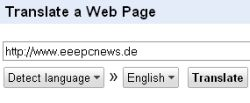 Google has udated its language translation page, adding support for Bulgarian, Croatian, Czech, Danish, Finnish, Hindi, Norwegian, Polish, and Swedish. That brings the total number of language you can translate to and from to 24.
But the most useful feature of the new Google Translate is the automatic language detection feature. You no longer have to select the language of a web page in order to translate it to English. Just choose "Detect language" and Google will attempt to figure out the source language for you and translate the page or text to the language of your choice.
Of course, the machine translation is still far from perfect. But awkward phrases and baffling idiom translations are a small price to pay for being able to read Norwegian newspapers.
[Via: Google Operating System ]
[Tag: ]
Google Reader gets (more) social
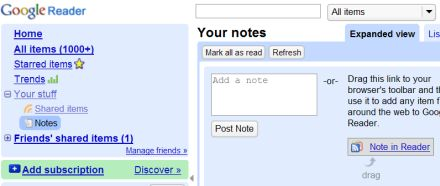
Google Reader users have long had the option of sharing items from their feeds. Just click the share button and anyone who knows the URL of your shared item feed can subscribe or view your shared items in a blog-like format. A few months ago, Google even started showing your shared items to your Gmail contacts automatically. But if you wanted to share items or web pages from sites that you didn't subscribe to, you were out of luck.
Now Google has launched several new tools that turn Google Reader into a bit more of a blogging/communication tool. There's a new browser bookmarklet that you can use to share any item on the web, whether the site has an RSS feed or not. Google has alsdo added a new Notes section to Google Reader that lets you enter text notes to share with your contacts. You can either enter a standalone note or click the "share with note" button on any article you're looking at in Google Reader to add your thoughts to a shared item.
You can also choose one of four graphic headers for your shared items page. There's the default Google Reader icon, ice cream, ninjas, or sea. No, we have no idea why these four, but we wouldn't be surprised to see Google add to the list of graphics later.
[Via: Download Squad ]
[Tag: ]
YouTube and New Orleans team up for presidential forum

YouTube, the mayor of New Orleans, and the governor of Louisiana have publicly invited the presidential candidates to participate in a presidential forum this September. Since this is not an official debate, it is unknown if any of the candidates will actually show up. Either way, the event should prove successful -- here's why.
It's been quite some time since New Orleans was hit by Hurricane Katrina, but the city is not done suffering. There's about 86,000 evacuees stuck in Houston, Atlanta and 40 other cities, and there the government currently has no plan on how it will bring these people home (not to mention the city's other 921,332,437,208 problems). So even if the candidates don't show up to the debate, the publicity stunt should help to remind government officials that it's not over yet. In other words, it's a giant call for help.
Despite that many may dismiss YouTube as a time-waster, this isn't the site's first dive into the presidential race. Last year, YouTube allowed its users to record and send in questions, which would be answered by the candidates on TV. And though we know the Google owned site gets a lot of great publicity out stuff like this, we can't help but tip our hat for the good work.
[Via: Silicon Alley Insider ]
[Tag: ]
Googleholic for April 25, 2008

In this edition:
- Google Finance gets a revamp
- Google Product Search updated; still lousy
- Google Docs initial offline rollout complete
- Goolgle annoyances
Google Finance gets a revamp
Google Finance has received a nice facelift. The U.S, Canadian and U.K. outposts all sport the new look -- as well as the newest member of the Google Finance family: China. The new language-specific site covers all the latest Chinese financial news and also offers links to other global markets.
Google Product Search updated; still lousy
Google Product Search, nee Froogle, has received an important update that only underscores the lameness of the service. Now, if you search for a generic item, like "computer" - a list of popular search results will appear with price comparisons, product reviews and more. Unfortunately, searching for an individual product (or a less generic term) still leads to one giant list of product mash-ups, sans the comparable price table or product description.
As Google Operating System pointed out, even the old Froogle service had this ability. Way to innovate Google. Even with the updates Google's Product Search still reminds us of a crappier version of MySimon circa 1999.
Google Docs initial offline rollout complete
After its soft launch last month, the initial rollout for offline Google Docs access is now complete.
In the early stages of the rollout, only word processing documents could be viewed or edited offline. Now Google has added view-only access to spreadsheets and presentations as well. The service is still English-only, and Google Apps users need to specify that they want the service in their preferences, but offline access is developing at a quick pace.
Google Annoyances
We might love our Google, but Google isn't perfect. In fact, lots of aspects of Google and their never-ending list of services annoy us. We aren't alone. The guys over at Google Operating System list some of their top pet-peeves.
Some of our favorites:
- Constantly having to re-enter our password when using Google Analytics, even when already logged in
- The craptasticness of Blogger's commenting system
- The inconsistent nature of the navigation bar
[Via: Google Finance Blog ]
[Tag: ]