If you've already registered for the Windows 7 beta but haven't downloaded the installation disc image yet, you'd better hurry up. Microsoft is turning off the spigot on Thursday morning at 9:00AM PST.
In order to register your copy of Windows 7 once you download and install it, you'll have to have already signed up for the beta. The cutoff took place last night. While Thursday might seem like a long time from now, it could take a while to download the disc image, which weighs in at about 2.5GB.
Of course, this doesn't mean you won't be able to find Windows 7 download links in the future. Just don't expect to find them from publicly accessible portions of the Microsoft web site.
[Via: Download Squad ]
[Tag: windows-7, windows-7-beta ]
Showing posts with label Windows. Show all posts
Showing posts with label Windows. Show all posts
Time's running out to download your (legal) Windows 7 beta
Track task times in your Google Calendar with a Gadget
There aren't many gadgets on my Vista or Windows 7 desktops yet. I have a hard time finding any that are compelling enough to keep installed. This handy little one from Raneri Web Design, however, is firmly lodged in the sidebar of my workbench computer.
The gCalTasks gadget is a slick desktop timer that integrates with your Google Calendars. Enter your credential and choose the calendar to track your times on - I decided to set up a brand new one specifically for tracking.
Enter a tag line for your task, click start, and then click stop when you're done. Information is automatically sent to your calendar, where the agenda view provides a nice recap of your activities. It's a simple, low-resource way to keep tabs on your time.
Thanks, Ricardo!
[Via: Download Squad ]
[Tag: billing, google-calendar, tasks, time-tracking, timer ]

The many faces of Windows 7
Not that this should come as a huge shock to anybody, but Microsoft doesn't plan to make Windows 7 available in a one size fits all package. As we've previously reported, there's been evidence of multiple SKUs for a while. But now Microsoft has come out and confirmed that there will be 6 different versions of Windows 7.
Here's the rundown:
- Windows 7 Starter Edition - for netbooks and developing markets, only runs 3 apps at a time
- Windows 7 Home Basic - also for emerging markets
- Windows 7 Home Premium - this version gets you Windows Media Center and other home use features
- Windows 7 Professional - the equivalent of Windows Vista Business, with extra security features
- Windows 7 Enterprise - this version will be sold in volume licenses for businesses
- Windows 7 Ultimate - has most of the features of the Enterprise version, but will be sold to end users
[Via: Download Squad ]
[Tag: windows-7 ]
bitRipper offers one-click DVD ripping
Want to convert your DVD into a video file that you can play on any computer, but don't feel like fussing with complicated DVD ripping software? It doesn't get much simpler than bitRipper. All you need to do is pop a DVD into your optical disc drive, fire up bitRipper, and click the Start ripping button. That's it.
Of course, you can click the settings tab to access more advanced features. For instance, you can change the audio or video codecs or adjust the bit rate, aspect ratio, or video resolution. At the very least, I'd recommend configuring the audio. The default settings use a ridiculously low bitrate that sounds just awful.
For some reason, when I tried ripping a video using the LAME audio codec, the audio and video were out of sync, but when I tried again using the Fraunhofer codec all was right with the world.
[Via: MakeUseOf ]
[Tag: bitripper, dvd, dvd-ripper ]

Minimize windows to the system tray with Minime
Tired of looking at icons in your Windows taskbar representing for every running program, including ones you don't click on very often? Minime is a little Windows utility that lets you minimize applications to the system tray. But unlike Trayconizer and TrayEverything, Minime doesn't replace a dozen taskbar icons with a dozen system tray icons. Instead minimized programs are hidden behind a single Minime button.
You can minimize any program using a customizable hotkey, and you can find the hidden apps by clicking the Minime icon in the system tray. It's worth pointing out that when programs are minimized to Minime they don't show up in the Alt+Tab menu, so you'll only want to hide apps that you don't need to access very often. For example you might want to minimize your music player since it can keep the tunes going in the background without your intervention.
Minime is a single executable file that doesn't require installation. In other words, you can throw it on a USB flash drive and carry it with you for use on any PC.
[Via: TechnoSpot ]
[Tag: minime, minimize, trayconizer, trayeverything ]

BitPim: Bluetooth syncing for CDMA phones

Bitpim is an an open source app that lets you access your phone's data via Bluetooth. I use it to get custom mp3 ringtones onto my junky Samsung dumbphone, and it works phenomenally well. There's a list of compatible phones on the Bitpim site, but chances are that yours will work. Be aware that Bitpim could potentially mess up your phone, although I haven't any issues with it personally.
[Via: Download Squad ]
[Tag: bluetooth, CDMA, open-source, phone, ringtone, sync ]
5 Fun, casual Steam games you can give for under $20

If you're a gamer, chances are good you've bought something from Steam - Valve's "Nexus of PC Gaming." If not, it's a great place to purchase some inexpensive and extremely fun games. Steam, of course, offers a gift purchase option, making it an ideal spot to find a nice, cheap gift for that special someone on your list.
Steam has tons of casual, fun games in its library - here's my list of five titles under $20 that are sure to provide some maddeningly addictive fun. Hardware requirements for these are fairly light, so they should run on just about anyone's desktop or laptop (provided they're running Windows).
World of Goo ($19.99). Sure, its cartoonish 2d graphics are cute, but this is one seriously smart physics puzzle game. Stack the little goo balls to build structures and reach the goal - it sounds easy, but World of Goo is as challenging as it is whimsical. Finessing your structures into doing what you want takes patience and requires some serious thinking at times. This one's a great choice for anyone who enjoys a good challenge.

Audiosurf ($9.99). This is one ridiculously cool racing game. Audiosurf dynamically creates courses based upon the music you're listening to while you're playing. There's definite cool factor in seeing your favorite tracks rendered as, well, tracks. Race to your favorite song, then see how your score measures up to other players online. The game includes the Orange Box soundtrack - which features Companion Cube's stirring rendition of Still Alive.

Eets ($9.99). An oldie but a goodie, this one gets referred to as a sort of Lemmings/Incredible Machine hybrid. Lead your Eets on the correct path to win levels and alter his mood (and reactions) by feeding him marshmallows. Like World of Goo, don't be deceived by the cuteness - Eets' puzzles get complex and can be extremely challenging. There are also 200 additional player-created levels to download to extend gameplay.

Mr. Robot ($9.99). HEL-9000, the computer brain in charge of the starship Eidolon, has gone evil, and it's up to Asimov to save the day. The game combines puzzle and RPG elements into a enjoyable but not frustratingly difficult package. Mr. Robot has received tons of praise for providing a simple, vintage-style gaming experience (think C64 and Atari) and stunning visuals. While it might not be overly complicated, it's 200-plus levels will provide plenty of game play.

Bookworm Adventures Deluxe ($9.99). Almost two years old, Bookworm is still a killer word game. In this edition, Lex is on a mythical journey and he can earn power ups to boost his word-powered attacks. It's a little bit of strategy and a lot of Boggle/Scrabble word building skill. Coping with time limits and still coming up with high-powered words can actually get very intense. There are three mini games and a survival mode to play as well.
Have another recomendation I missed? Share it with our readers in the comments!
[Via: Download Squad ] [Tag: games, gifts, hgg, holiday-gift-guide, steam ]
Flipping the Linux switch: Switching, literally, with Ulteo Virtual Desktop

We are a little bit disturbed. Not in a "We just watched a David Lynch movie" sort of way, but still, it is a little unnerving to think that our last post on Ulteo hinted at a world domination plot... and now it seems that goal is within their reach.
It is also a little unsettling to eat our words. We read about Ulteo's Virtual Desktop and its claims to run Linux apps quickly and smoothly under Windows. And we thought, "Yeah, right." We've used embedded Linux on Windows before. It works in a pinch, but it's not terribly responsive. It's also a little disorienting to be working in Linux, and then need to manually perform some key combination or mouse gesture to get to a Windows application.
Like andLinux, Ulteo's Virtual Desktop (often referred to with the rather misfortunate name UlteoVD) runs off a coLinux base. There is no virtualization software involved. But we'd especially recommend UlteoVD for those pondering whether a Linux switch could work for them, for a number of reasons.We'd recommend UlteoVD first to people who are currently using or could see themselves using their previous services. Ulteo started by offering OpenOffice.org in a browser, coupled with syncing services. Nice, for sure. They then offered an installable Ulteo disk, which felt a lot like Ubuntu in many ways, with the noticeable difference of automatic updates (as in, no user interaction) and syncing with the browser based services.
If you are into those previously listed offerings, that's great. We'd venture to say, though, those aren't the most appealing ways to ease into Linux or learn about Linux applications. Usually applications in browsers are slow, and jumping headfirst into a new operating system install (especially one clearly marked "beta") is (understandably) terror-inducing.
This is a great middle-of-the-road approach. Once UlteoVD is installed, you have access to essentially all the programs you'd find on most popular Linux distros. You also have simultaneous access to your Windows applications, and Desktop and My Documents files. UlteoVD lets you see if the Linux environment and applications are right for you without needing to dual boot, or even reboot.
UlteoVD is a large download, and does take up quite a bit of disk space (approximately 4 gb). It is easy to install, though there were some agonizingly long waits at certain stages of the installation. We'd advise anyone installing (especially on older, or underpowered machines) to be really patient with the install, and the first launch of the virtual desktop. The first dig at the desktop took an inordinately long time to actually launch. Subsequent virtual desktop launches aren't nearly as lengthy. Launching applications from the virtual desktop is just as fast (or faster) than launching a native Windows app.
We noticed as UlteoVD was launching that it did a few potentially scary things. We lost our network connection, for instance. We assume that it was because UlteoVD was accessing the network, and we were a little nervous that we wouldn't be able to access the internet except through the Linux application side of things.
This isn't the case. We were just as able to fire up IE as we were the UlteoVD-installed instance of Firefox. Not particularly sure how often we'd have need to do that, but it all worked smoothly.
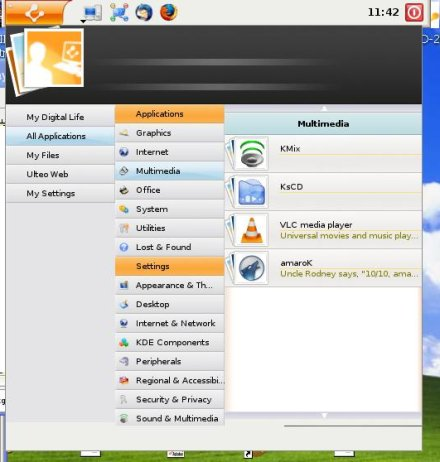
One of the reasons we think UlteoVD would be a great choice for potential switchers is the reasonably familiar interface. It's not quite as sparse as some of the "Kicker" options on andLinux, and but still manages to stay out of the way. The menu options are presented in a way that's similar to a standard KDE desktop install on Linux, and we feel that the layout and file navigation options that Ulteo has given the virtual desktop not only makes things easier on the Windows-integration side of things, but should quell some of the butterflies that occur when a new user logs into the Linux /home directory for the first time.


We were curious about how updates were handled and how packages could be added. It seems as though it might be a bit trickier to install a more off-the-beaten-path sort of program from the Ulteo repositories, but it is quite easy to install their generic desktop and game applications, as well as language support.
Ulteo also gave us the option of trying their default (stable), edge, or testing repositories. We tried both stable and edge with no catastrophic events. We did have UlteoVD crash once, and promptly relaunch. Considering that is still a beta, and that we were having issues with a native Windows photo editing application at the time, it wasn't particularly surprising.
Ulteo also gave us the option of trying their default (stable), edge, or testing repositories. We tried both stable and edge with no catastrophic events. We did have UlteoVD crash once, and promptly relaunch. Considering that is still a beta, and that we were having issues with a native Windows photo editing application at the time, it wasn't particularly surprising.

Seriously, though, this is the best news of all for those of you wondering if Linux might be something to explore further. You get to play with the Linux applications and see if they suit your needs without having to worry about system support in a larger sense. Because of the way UlteoVD is set up to run, it's less likely you'll have the peculiar hiccups that might arise on a new Linux install. With this sort of scenario, you'll become familiar with the overall way the Linux applications work, instead of getting lost in configuration minutiae.
We were really tickled we could use Amarok on Windows XP now without the fun of compiling and tweaking for limited results. (We love to tweak with Linux, but somehow Windows seems to kill the joy in it.)
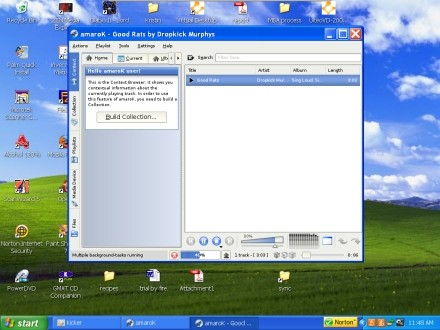
We were really tickled we could use Amarok on Windows XP now without the fun of compiling and tweaking for limited results. (We love to tweak with Linux, but somehow Windows seems to kill the joy in it.)
UlteoVD is available as a beta for both Windows XP and Vista 32-bit releases. We strongly recommend it for people thinking of trying out Linux, as well as those who prefer Linux and its native applications who can't always use a Linux machine.
[Via: Download Squad ]
[Tag: ]
IE7Pro 2.3 adds prefetching, session management to Internet Explorer

IE7Pro is a plugin for Internet Explorer 7 and 8 that brings some of the best features of Firefox and other web browsers to Microsoft's browser. Yes, we know many folks would suggest just using Firefox or Opera, but if you need to use IE for one reason or another (perhaps there are some web sites you visit regularly which aren't rendered properly by other browsers), IE7Pro can make your browsing experience much more pleasant.
IE7Pro 2.3 was released today, with a handful of bug fixes and new features, including:
- FasterIE module with support for prefetching, which should speed up your browsing experience
- Session Manager which allows you to save open tabs when closing your browser and reopen those tabs next time you login.
- The MiniDM download manager now supports drag & drop and multiple links
You can check out a complete list of updates in the IE7Pro 2.3 changelog.
[Via: CyberNet ]
[Tag: ]
Backup your Firefox, Flock, or Thunderbird profiles with MozBackup 1.4.8

Last time we checked in on Firefox backup utility MozBackup, the developer had just added support for Firefox 3 beta. Apparently it's been a busy half year over at MozBackup HQ, because this week MozBackup 1.4.8 was released, with the following new features:
- Create automatic backups via command line
- New Installer
- Supports backup of unknown files from user profiles
- Backup profiles and settings for: Firefox 2/3, Flock, SeaMonkey, Netscape Navigator 9.0, Netscape Messenger 9.0, Thunderbird, Spicebird, Firefox Portable, and Thunderbird Portable
If you're just looking or a quick way to backup your Firefox extensions, bookmarks, and other settings, you can always check out the FEBE and CLEO Firefox add-ons. But MozBackup looks like a nice all-in-on tool if you have several Mozilla-based programs that you want to backup.
MozBackup is available for Windows 98 through Vista.
[Via: CyberNet ]
[Tag: ]
Folder View adds recent and favorite folders to Windows Explorer
 Folder View is a free Windows utility that gives you quick access to the folders you use most often in Windows Explorer. You can add shortcuts for every folder in My Documents, or choose custom folders to add to the toolbar. We'd advise against selecting an entire drive, since you'll wind up with a toolbar several rows deep filled with folders. It sort of defeats the purpose of having shortcuts when it takes you five minutes to find the one you're looking for.
As Martin at gHacks points out, one of the most useful features of Folder View is the recent folders toolbar. If you've accidentally closed a folder that you want to recover, this feature can be a life saver. It's not quite as magical as the recover closed tab feature in Firefox, but it's actually more useful since you can also use the Recent folders button to access your most frequently used folders in a snap.
Folder View also shows up in your Windows download and upload dialog boxes, making it easy to keep your files organized if you like to store your downloaded files in several different directories.
[Via: Download Squad ]
[Tag: ]
Tweak your Windows animations with Lebendig
Lebendig is a free Windows utility that adds a bit of eye candy to your window transitions. When you launch or close a window you can have it fade in or out, scroll down from the top of the screen, up from the bottom, or move from left to right or vice versa. Overall there are about 15 transitions to choose from, although to be honest, some of them looked pretty much identical to us.
You can adjust just how windows look when they launch, or when they close or specify which types of windows you'd like to be affected. For example, if you want program windows to use the default Windows animations while Explorer windows fade in and out, you can do that.
Lebendig comes from the developer of DExposE2, an Expose clone for Windows. And while Lebendig certainly isn't the only tool that adds a bit of eye candy to Windows XP, it's worth checking out for its low memory footprint. It tends to use 8MB of RAM or less.
[Via: Lifehacker ]
[Tag: ]
MP3-Check examines your music collection, tells you what's wrong with it

Got a few thousand MP3s in your music collection with missing or incorrect ID3 tags? MP3-Check won't fix them for you, but it will let you know what's missing. It's a light weight utility that can process large amounts of information quickly and let you know if your MP3 files:
- Are missing ID3 tags
- Don't meet your bit rate or sample rate requirements
- Are stereo or mono
- Meet a specified volume threshold
MP3-Check also lets you choose third party tools to associate with the program so that, for example, when you find an MP3 with no ID3 information you can right click on it to launch your favorite ID3 tag editor. If your ID3 tags aren't just missing, but are actually wrong, you might want to check out a tool like MusicBrainz which will compare your files with an online database and try to find the correct metadata.
[Via: GHacks ]
[Tag: ]
OLPC Sugar OS takes on a life of its own, will anybody care?
 The OLPC team yesterday announced plans to load Windows XP on XO Laptops in a handful of countries in June as part of a limited trial. By September, Windows could be available to any developing nation placing orders for XO Laptops. And today, Walter Bender, the former president of software for the OLPC Foundation says the unique software interface that was designed for the XO Laptop will live on. Maybe.
Here's a little background. The XO Laptop was designed to be a cheap laptop that could be distributed in developing nations to help bridge the digital divide. The original plan for the XO was to use Linux as an operating system because it's cheap, works well on low-powered devices, and because it's open source anyone could write software for it easily. A unique desktop environment called Sugar was built to make Linux more user-friendly. But many governments have been reluctant to place orders for the laptops because they don't run Windows, which is the desktop operating system used by most of the rest of the world. So the OLPC Foundation has been working with Microsoft to bring a low cost version of Windows XP to the XO.
But what does that mean for Sugar? Walter Bender says Sugar Labs, a new non-profit will develop new versions of the software. The goal is to continue developing open source software for the XO so that children in developing nations will be exposed to open source applications and ideals as they learn about computing. The question is, if Windows XP is available for just $3 more than Linux, will anybody buy the Linux/Sugar version? Yes, we know that many Download Squad readers would be more interested in the Linux models, but if the goal is to give school-age children in your country computer literacy, wouldn't you want them to use the same software that most students in countries like the US are using?
[Via: Download Squad ]
[Tag: ]
Instan-T: Voice, video and text chat client for Google, AOL, MSN, and Yahoo!
 Your co-workers use MSN Messenger, your family is partial to AOL Instant Messenger, and your friends use Google Talk. There are plenty of utilities that let you keep in touch with all of your contacts regardless of the IM platform they're using. But while we love Digsby, Trillian, Pidgin, and Adium most of the time, there are a few features missing from those apps:
- Support for voice and video chats
- The ability to invite friends from different IM networks into a single chat room
And that's where Instan-T comes in. This multi-protocol chat client for Windows supports AOL, Google, Yahoo!, and MSN Messengers. It also supports voice and video chat across each network, although we've found that feature to be a bit finnicky. When we tested out a voice chat, we were able to the person speaking on the other end, but she couldn't hear us. We'll chalk that up to a hardware problem.
Probably the most interesting thing about Instan-T is that it lets you set up a chat room that you can invite contacts from any service to participate in. Just click on a contact name and select multi-person chat. They'll receive an invitation with a URL to click on that will open up a Flash-based chat room, which also features voice and video support.
We'll be honest. The Instan-T interface is a little cluttered and confusing when compared with other multi-protocol chat clients. But the application definitely shows promise. If you want to try the service without downloading and installing anything, you Instan-T also has a Meebo-like web based instant messenger. The web client supports Internet Explorer and Firefox, which means you should be able to access the service whether you're using Windows, Linux or OS X.
[Via: TechnoBuzz ]
[Tag: ]
NewsGator releases FeedDemon 2.7: Desktop RSS reader
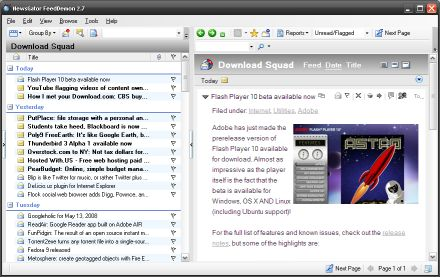
NewsGator has released an updated version of FeedDemon, the company's desktop RSS reader for Windows. FeedDemon 2.7 features a ton of bug fixes, a handful of new features, and best of all, it's still free. NewsGator used to charge for its desktop reader, but starting with FeedDemon 2.6 and NetNewsWire 3.1 for Mac the company started offering desktop clients for free.
Here are just a few of the changes in FeedDemon 2.7:
- Quicker navigation of the subscription tree
- Subscribe to multiple feeds at once from the "find feeds" menu
- Copy a multi-line URL into the address bar and it will be shortened to one line
- Support for multiple enclosures in a single post
Note that the FeedDemon home page still says the latest version is 2.6. But if you click the download link you should get FeedDemon 2.7.
[Via: Digital Inspiration ]
[Tag: ]
Microsoft releases Virtual PC 2007 SP1

Microsoft has released a new version of its free virtualization sotware with support for the latest Microsoft operating system updates. Virtual PC 2007 SP1 includes support for Windows Vista SP1 and Windows XP SP3 as host and guest operating systems. That means you can run the virtualization environment if you're using those operating systems, or if you want to emulate them. Microsoft also threw in Windows Server 2008 Standard for good measure.
Like its predecessor, Virtual PC 2007 SP1 does not officially support Windows XP Home Edition or Windows Vista Home Premium or Home Basic. But for the most part, it will run just fine on those operating systems. You will, however, get a warning message telling you that you're using an unsupported OS when you install the software.
[Via: WinBeta ]
[Tag: ]
FunPidgin: The result of an open source instant messaging spat
So a funny thing happened on the way to Pidgin 2.4.1. The developers of the open source, cross-platform, multi-chat protocol client recently implemented a new feature. When you're typing in a text box, it will start out just large enough for a few lines of text. And if your message gets longer, it will automatically resize. Pretty cool, right?
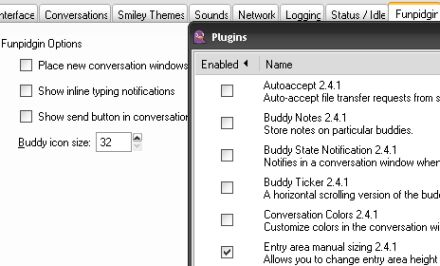
But the developers decided to eliminate the ability to change the text box manually. And that led to a rather intense debate in the Pidgin community. And the result is that there are now two branches of Pidgin. There's the "official" build which lacks image resizing because the developers didn't want to back down or even offer the option of changing the default behavior with a plugin. And there's the new Funpidgin build which has the same default text box behavior as Pidgin, but allows you to manually change text box sizes via a plugin.
We're going to ignore the question of which version is actually more "fun," and just point out that Funpidgin can basically do everything that Pidgin can, plus you can resize the text box manually. Funpidgin also has a few other features that Pidgin lacks, like the ability to adjust buddy icon display sizes.
[Via: Ubuntu Unleashed ]
[Tag: ]
Monitor your hard drive usage with DriveSpacio
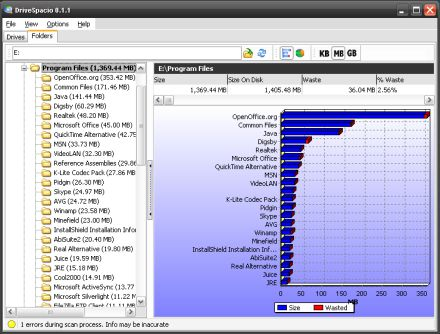
DriveSpacio is a free Windows utility for examinging hard drive usage. When you first boot the program you'll get a list of each hard drive and partition on your system, along with, some details like the files system, cluster size, and a pie chart or bar graph showing used and free space.
But the fun really begins when you click on the Folders section. You can choose a folder, or an entire drive (just click C: or E: or what have you in the browse window), and DriveSpacio will plot your folders on a graph showing you which of your folders are eating the most space. It taks a few moments to scan folders with a lot of subfolders or files, but the result is a pretty effective tool for figuring out why you're running out of space on your hard drive.
WinDirStat is another free utility which does pretty much the same thing. But if you prefer the bar graph/pie chart look to WinDirStat's more abstract-looking visualization, DriveSpacio is worth a look. But there is at least one area where WinDirStat holds the edge: while you can delete files from the WinDirStat interface, DriveSpacio only shows you file and folder names. It doesn't let you launch or delete files.
[Via: Shell Extension City ]
[Tag: ]
Cyber Bandwidth Monitor: Keep track of your bandwidth usage
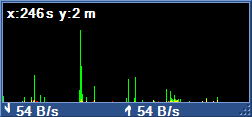 Cyber Bandwidth Monitor does pretty much exactly what you'd expect it to do, and more. This little WIndows utility tracks your upload and download speeds over time and plots your network activity on a little graph. The utility grabs data once per second, but you can adjust the settings so that it refreshes more frequently. You can also tweak a ton of display settings, ranging from the font and window size to the graph scale.
In addition to real-time information, the program also logs all of your activity over time and can send you daily, weekly, or monthly updates. Cyber Bandwidth Monitor also has a few other useful features, like built in Ping and Traceroute utilities.
[Via: Shell Extension Cty ]
[Tag: ]
Subscribe to:
Posts (Atom)