There aren't many gadgets on my Vista or Windows 7 desktops yet. I have a hard time finding any that are compelling enough to keep installed. This handy little one from Raneri Web Design, however, is firmly lodged in the sidebar of my workbench computer.
The gCalTasks gadget is a slick desktop timer that integrates with your Google Calendars. Enter your credential and choose the calendar to track your times on - I decided to set up a brand new one specifically for tracking.
Enter a tag line for your task, click start, and then click stop when you're done. Information is automatically sent to your calendar, where the agenda view provides a nice recap of your activities. It's a simple, low-resource way to keep tabs on your time.
Thanks, Ricardo!
[Via: Download Squad ]
[Tag: billing, google-calendar, tasks, time-tracking, timer ]
Track task times in your Google Calendar with a Gadget

Mailplane 2.0: desktop Gmail client now supports Gmail video chat
If you use Gmail on a Mac, you should definitely know about Mailplane. It's basically a really fancy site-specific browser for Gmail, getting Gmail out of your browser tab and adding a lot of features you'd demand in a desktop email client. You can drag and drop attachments and sign in multiple accounts at once, just to name a couple. Plus, a release candidate for Mailplane 2.0 just came out, and it adds 37 new features.
You can do anything in Mailplane that you can do in Gmail, including the new video chat feature. The new gmail themes are also supported, and you can add your own custom stylesheet. It feels strange to use Gmail in a browser again after playing with Mailplane. Customizable keyboard shortcuts, dragging and dropping, and iPhoto integration are just a few of the handy features that make Mailplane a joy to use. It also supports one of my personal favorite things, Growl notifications
[Via: Download Squad ]
[Tag: gmail, gmail-2.0, mailplane, video-chat ]

Things GTD app expires, causes stir amongst users
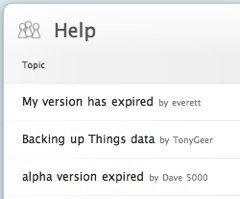 Things, the popular personal organization application from Cultured Code, is still in testing, but it already has a large userbase that is thoroughly addicted to its attractive to-do list features. It's no surprise, then, that when the clock turned to midnight in Australia and Things suddenly expired, users were up in arms. Hours later, users in the US experienced the same problem. Several people congregated on the official Things help forum, which had nearly 50 postings on the problem as of 2:30 this morning.
Cultured Code hasn't yet responded with an explanation of why Things was set to expire. The application is still free, but users have already come to rely on it, with more than one person posting that they would gladly pay the $49 pricetag Cultured Code will charge for the 1.0 release to continue using Things right now. Why the expiration, though? We expect to see either a quick fix or an update pushed out this morning -- as the app is currently at version .9.1.1, the highly anticipated 1.0 release is possible, but not likely.
If you're a Things user, visit the help forum for some unofficial ways of resolving the problem. So far, most people are either setting their computers' dates back or using a hex editor to change the expiration date. Despite all the fuss, this could end up working in favor of Cultured Code. Our take: any publicity is good publicity when people are this frantic about your product.
Update: Version 0.9.1.2 is now available.
[Via: Duncan Riley ]
[Tag: ]
Web-based Vi text editor hits the web: text-edit from anywhere!

Such remote locations include but are not limited to:
- your local library
- the internet cafe down the street from work
- your aunt's house
- those weird McDonald's locations with internet computers inside
- the boss' laptop
- Russia
[Via: Download Squad ]
[Tag: ]
Web-based Vi text editor hits the web: text-edit from anywhere!

Such remote locations include but are not limited to:
- your local library
- the internet cafe down the street from work
- your aunt's house
- those weird McDonald's locations with internet computers inside
- the boss' laptop
- Russia
[Via: Download Squad ]
[Tag: ]
Web-based Vi text editor hits the web: text-edit from anywhere!

Such remote locations include but are not limited to:
- your local library
- the internet cafe down the street from work
- your aunt's house
- those weird McDonald's locations with internet computers inside
- the boss' laptop
- Russia
[Via: Download Squad ]
[Tag: ]
Speed up the feel of Windows with the double-click speed setting
 Speed is all about perception, so any tip that makes a computer feel faster is gold as far as we're concerned. Today's tip is a doozy from Raymond Chen, the venerable Microsoft developer and blogger.
According to Chen, a number of user interface timers in Windows key off of the double-click speed registry setting.
The default double-click speed in Windows is 500ms , or exactly 1/2 of a second. Try dropping that down to 250ms -- about three-quarters of the way towards Fast -- and watch the rest of Windows feel just a bit snappier, since a number of other Windows user interface timings use that setting as a reference. Cool!
[Via: Download Squad ]
[Tag: ]
Make Firefox more responsive when loading pages - Browser Tip
 For some reason when a page is loading in Firefox, it doesn't seem to respond to user interaction immediately. For example, say you're loading a very long page (maybe you're using a free Backpack account), and you know that the content you need is half way down the page. By default, Firefox will ignore user interaction in favor of giving all processing power to page rendering.
It may well be that Firefox's engineers made this decision for a very good reason, but what if it bugs you that Firefox ignores you when you know exactly what you want to be doing? Well, it turns out there's a hidden setting in Firefox that will allow you to bend it to your will.
Firefox uses two priority modes when rendering a page: a low-priority mode that often checks for user input, and a high-priority mode that prioritizes page rendering over user input. There is a timer that determines how long Firefox will wait for user input before switching to high-priority rendering mode.
The Geek at How-To-Geek researched this setting, and determined that switching the default value from 750000 to 1000000 is a good balance that allows for a more responsive feeling browser, while still giving an adequate amount of time to the high-priority mode.
To make this change yourself, type about:config into your Firefox address bar, then type content.switch.threshold into the Filter field. You will likely not have any results returned. If the setting already exists, simply switch the value from the default 750000 to 1000000. If it doesn't, right click anywhere in the window and choose New > Integer. Use the following setting:
- Key Name: content.switch.threshold
- Key Value: 1000000
[Via: Download Squad ]
[Tag: ]
Presdo: Yet another online scheduling app

First, it uses natural language recognition to help schedule your meetings. The home page isn't filled with a bunch of boxes to fill out. Instead, you have one search box, into which you can type "lunch with Bob," or "dinner with Joan." On the next page, Presdo will make an educated guess as to the best time for your event. If you enter something vague like "take over the world with Pinky," it'll probably just use the default "tomorrow at 10am." But it does a pretty good time of picking the proper times for meals.
You can also use Presdo to help find a place for your meeting. If you entered "Coffee with Mike," Presdo will let you pull up a window to search for coffee shops with Google Maps. When you send out your invitation, recipients can either accept or offer their own suggested times.
[Via: TechCrunch ]
[Tag: ]